
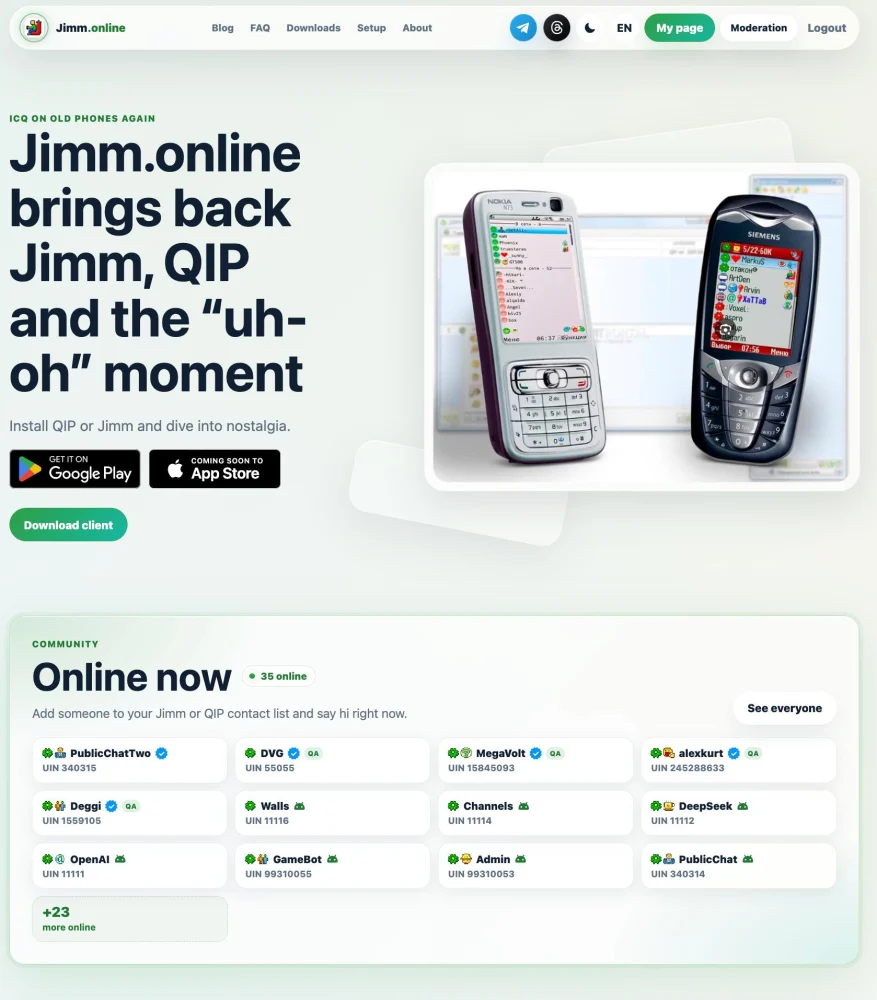
I'm backend developer at my day job I mostly write PHP. For the past six months I've been building Jimm.online: my own ICQ clients for macOS, Linux, Android and the browser, plus a website and bots around an ICQ server you can connect to even from an old Jimm on a Java phone.
I want to talk less about features and more about how it all works, which parts are mine and which aren't, and the problems I ran into along the way.
I've been thinking about writing this post for quite a while. I didn't want to show up here and announce yet another empty ICQ server with nothing much to offer. Instead, I wanted to wait until there was something substantial to show: multiple clients, a web platform, browser extensions, social features, bots, and an API for developers.
One thing I particularly like is that you can register the exact UIN you want, as long as it's available. You can choose a number that means something to you, perhaps the same UIN you used back in the 2000s.
I hope you'll find the story behind the project interesting: not just what works today, but also how it was built, the problems I ran into, and what I'd like to do next.
By the numbers
As of October 2026:
- 3,000+ accounts on the server;
- a steady 40+ people online;
- 700+ installs of the app from Google Play;
- 10+ concurrent users in the app, peaking at 35 (Amplitude);
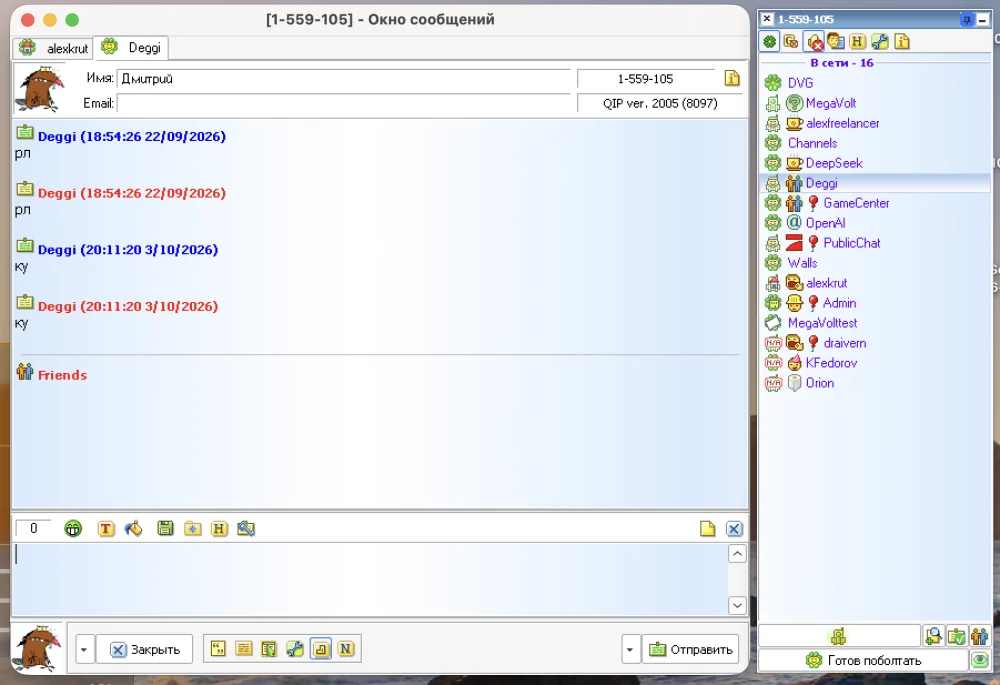
- 4 clients of our own: QIP for macOS, Linux and Raspberry Pi, Jimm for Android, a web client, and extensions for Chrome and Firefox;
- 4 ICQ bots: AI, channels, walls, and a public chat.
How it all started
The full personal story is on the blog (in Russian): "Why the Jimm ICQ project matters so much to me". In short: 2005–2006, a Motorola V360, an article about Jimm in a mobile phone magazine, and my first UIN, registered for me by a friend who had a computer. ICQ is a big part of why I became a developer.
The goal of the project is simple: to keep UINs from disappearing for good. Anyone who misses those days can sign in again, see their contact list, and go back to 2007 for a while.

First attempt: a server of my own
At first the idea was modest: build a Jimm by Xattab look-alike on a modern stack. I recreated the interface from old screenshots, added registration and set up a WebSocket server (Centrifugo).
It quickly became clear this wouldn't work. Drawing the interface isn't enough: you need the protocol, the icons, the sprites, the exact client behaviour. So I tried connecting the real Jimm: I wrote a simple authorization server and studied the app's network traffic. Part of that work went into my first upstream PR, #185 "Feat server for Jimm 0.6.0".
Why Open OSCAR Server
I looked at the OSCAR servers available and chose Open OSCAR Server by Mike (mk6i). Three reasons:
- it's written in Go, and I'm interested in Go;
- the repository is alive: recent commits, issues that get answered;
- the project has a Discord community [LINK: Discord].
What settled it was my first experience. I came to Discord because my client wouldn't connect, Mike shipped a fix, and everything worked.
Let me draw the line right away: the server is Mike's project (MIT license); I didn't write it. I use it as the foundation, test it with real users and send fixes upstream. Everything else described below I wrote myself. I work on the project alone, with help from the community on Telegram. My own code is closed for now; the only public part is my fork of the server, which upstream PRs come from.
Architecture
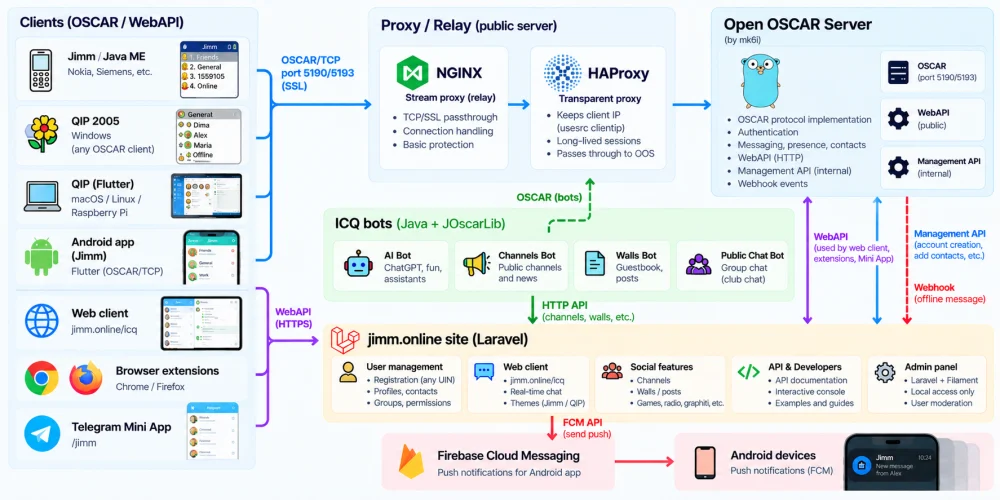
| Component | Stack | Whose |
|---|---|---|
| ICQ server | Go | Mike's (with a few patches of mine on top) |
| jimm.online website | Laravel, vanilla JS + Vite | mine |
| Web client (on the site and at /icq) | vanilla JS over the server's WebAPI | mine |
| QIP 2005 for macOS and Linux | Flutter, UI laid out in Figma | mine |
| Jimm Android app | Flutter, its own OSCAR client over TCP | mine |
| Chrome and Firefox extensions | the web client packaged as an extension | mine |
| AI bots; Channels, Walls and public chat bots | Java + JOscarLib with my patches | mine |
| Admin panel | Laravel + Filament, runs locally only | mine |
A few decisions worth explaining:
- The Android app speaks native OSCAR, not the WebAPI. It's simpler, the WebAPI is missing some methods I need, and above all I wanted to recreate Jimm by Xattab specifically, and it ran over OSCAR.
- Flutter for the clients. One stack for both the phone and desktop QIP, which means builds for macOS, Linux and ARM without a separate codebase for each system.
- Bots in Java. Java has a ready-made library, JOscarLib. I had to patch it for Cyrillic and Unicode, but that was still faster than writing an OSCAR client from scratch.
Clients: the heart of what I do
The server is the foundation, but nobody stays on it without convenient clients. The most common pain I've heard from people is: "I want to get back on ICQ, but how?" The original QIP 2005 was written for Windows XP, so on a Mac or Linux you have to run it under Wine. Jimm is Java ME, so on a modern phone it needs an emulator such as J2ME Loader. All of this is unstable, and for many people the setup hassle is reason enough to give up at the very first step.
So my main focus is the clients: ICQ should launch like a normal app, with no Wine, no emulators and no manual server setup.
QIP 2005, rewritten from scratch
Old classic version QIP just for Windows
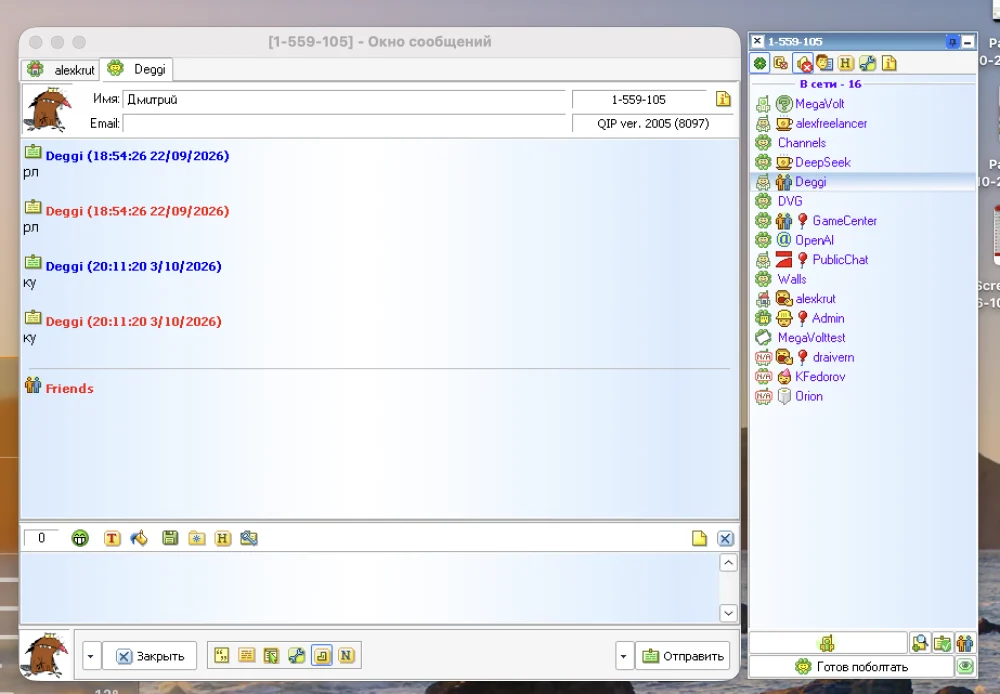
New version MacOS / Linux
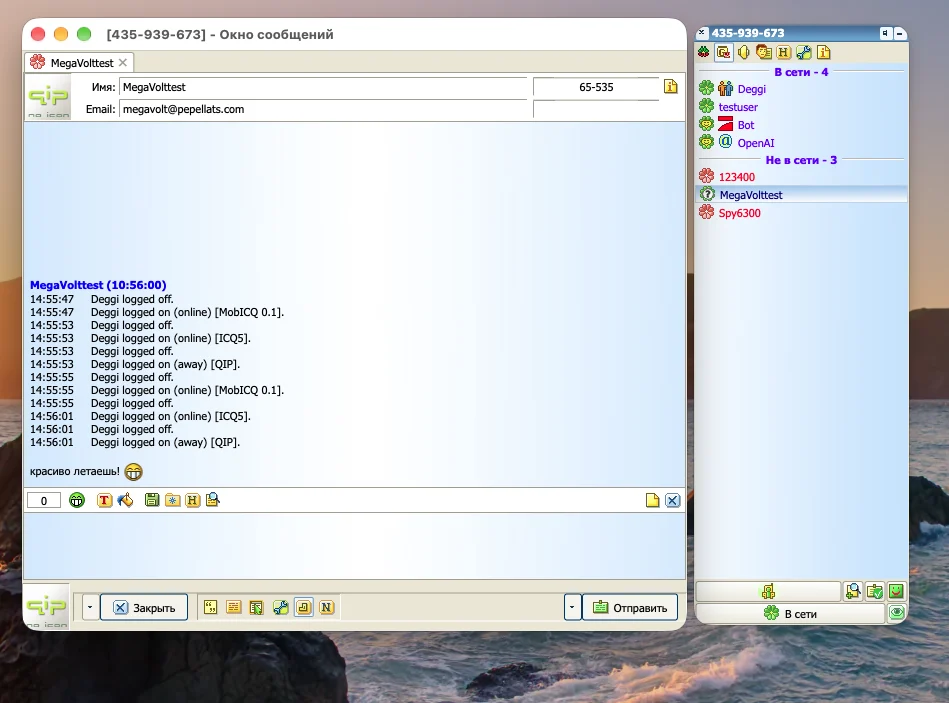
This is my favourite part. QIP was hugely popular back in the day, and many people remember ICQ precisely as QIP. I laid out the QIP 2005 interface in Figma from the original and wrote the client from scratch in Flutter. The result is a native app for each system: the same contact list, statuses, windows, sounds and "uh-oh", but no Wine.
- macOS 12 and later, Intel and Apple M1–M4;
- Linux: .deb for Ubuntu, Debian and Mint, .rpm for Fedora and openSUSE, AppImage for everything else;
- Raspberry Pi and other ARM machines;
- Windows: the original QIP 2005, XP through 11.
The icq.jimm.online server is preconfigured: you just enter your UIN and password. For every system, jimm.online/qip has step-by-step installation and fixes for common problems, such as what to do when macOS refuses to open an unsigned app.
Jimm for Android, no emulator needed
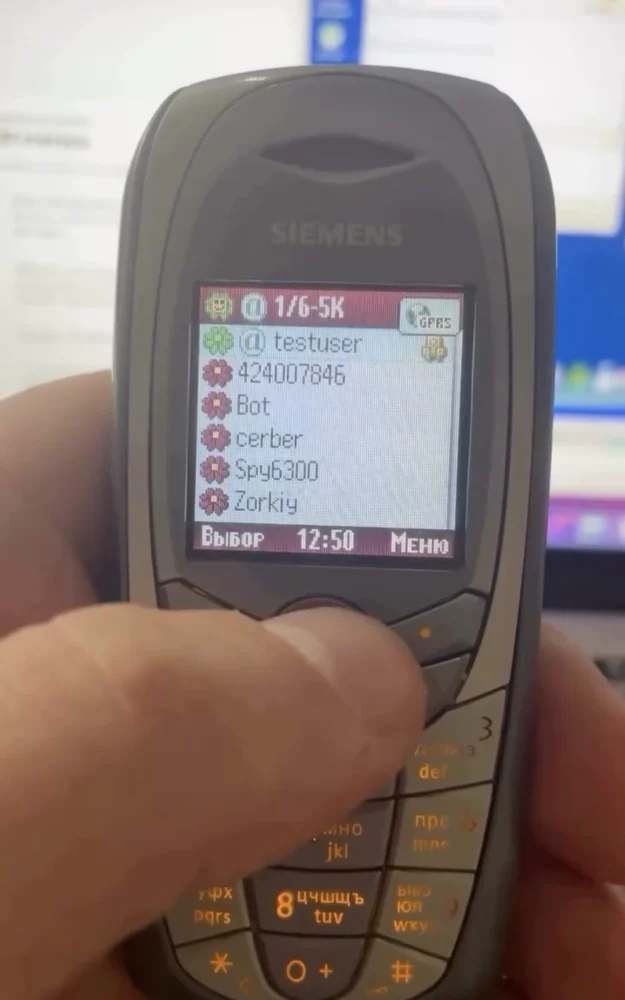
Same idea for the phone: instead of a Java midlet in an emulator, a native Jimm for Android app built with Flutter. The goal was to recreate Jimm by Xattab specifically: the look, the sprites, the behaviour. That's why the app talks to the server directly over OSCAR, just like the real Jimm.
It also has things that didn't exist in 2007: push notifications, Unicode and emoji, SSL, reconnecting on a bad network, and sending logs to the developer straight from the settings. And for those who used QIP, there's a QIP theme: smileys, colours, sounds.
New theme QIP

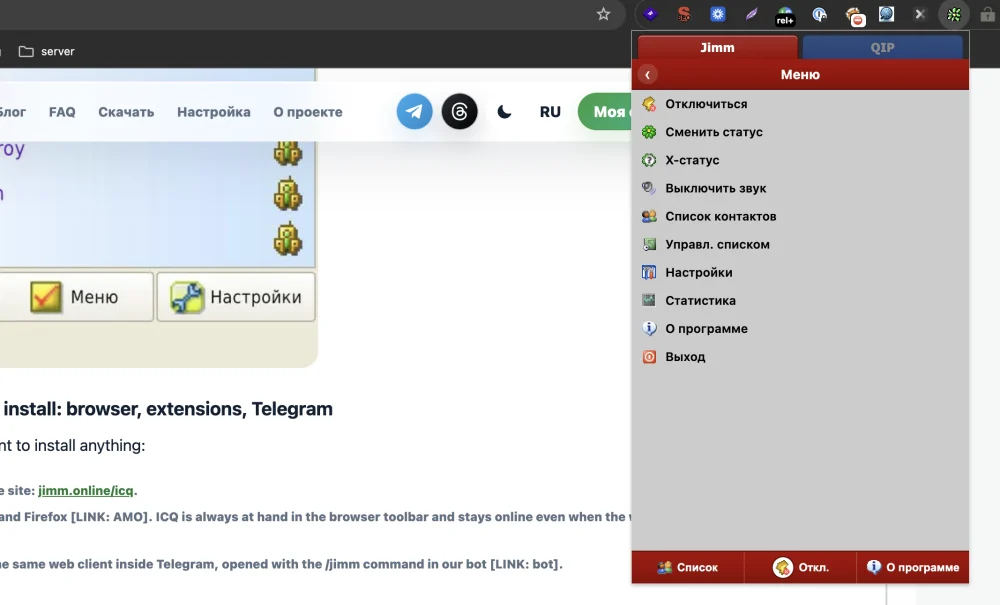
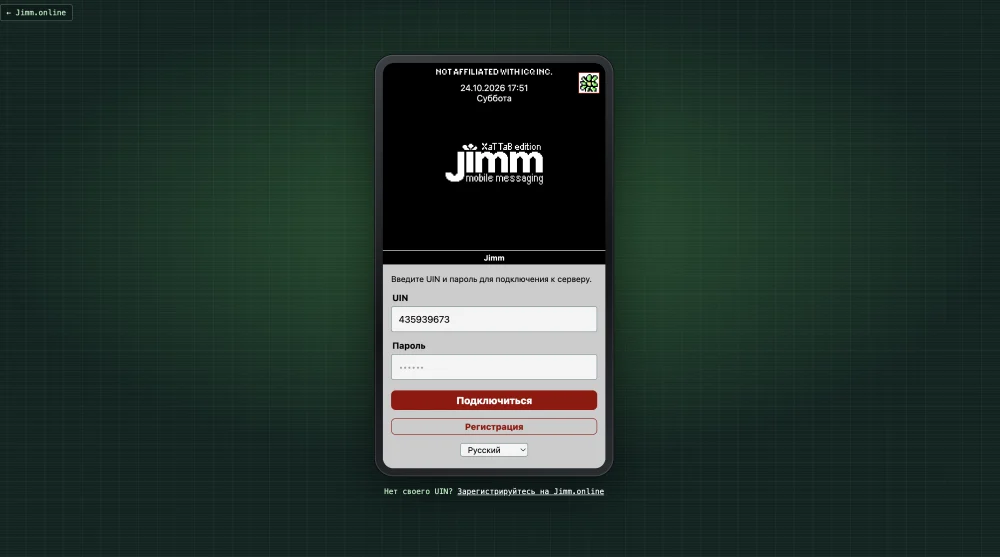
ICQ with nothing to install: browser, extensions, Telegram
For those who don't want to install anything:
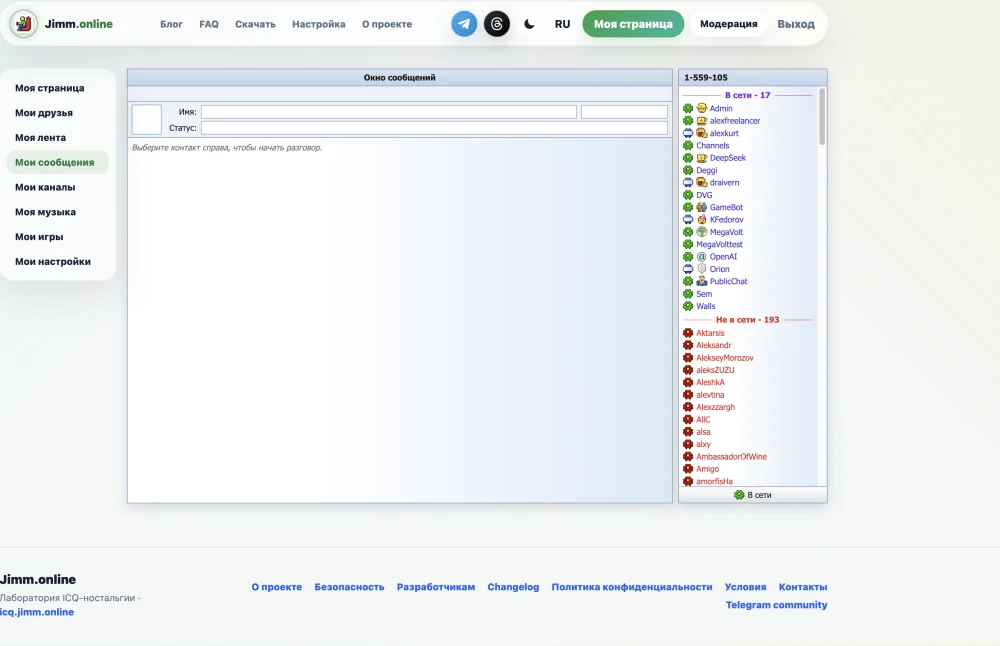
- A web client right on the site: jimm.online/icq.
- Extensions for Chrome and Firefox [LINK: AMO]. ICQ is always at hand in the browser toolbar and stays online even when the window is closed. The QIP theme is here too.
- A Telegram Mini App: the same web client inside Telegram, opened with the /jimm command in our bot [LINK: bot].
Classic clients work too
If you want the real thing, use the original Jimm (download it here), QIP 2005 on Windows, or any other OSCAR client: server icq.jimm.online, port 5190, or 5193 with SSL. Compatibility with old clients is a must for me: everything new (channels, walls, AI bots) works on them as well.
The main challenge: modernising a protocol from the 2000s
The hardest part wasn't any single bug but the overall question: how do you make an old protocol convenient in 2026?
Today people expect things OSCAR never considered: notifications when the app is closed; proper Cyrillic and emoji, in an old client and in the browser at the same time; one account across several devices and tabs; contact names and avatars; encryption. And old clients must keep working exactly as before.
What's been done:
- Push notifications. When a message arrives for someone who is offline, the server tells the site, and the site sends a push via Firebase. For that I added a webhook to the server. It's a temporary solution: Mike is designing push for the server as a whole (#208), and once it's out we'll switch to it.
- Encodings. Old clients send text in CP1251, UCS-2 or whatever they please, while the web works in UTF-8. I had to fix text handling in the server, in JOscarLib and in every bot. I sent my version in PR #192, and Mike made a general solution for all clients in v0.25.0.
- Contact nicknames and avatars. The WebAPI didn't have these, so I added them to the server's management API. They're now proposed upstream in PR #215.
- Multiple tabs and devices. The web client keeps tabs in sync with each other, and the app reconnects gracefully.
- Encryption. SSL on port 5193 is Mike's work; I only forwarded the port through my relay.
Still unsolved: push works only on Android; I don't have an Apple developer account for iOS yet.
Keeping it from being boring: an ICQ with something to do
The problem. Once the server and clients worked, it turned out that connecting isn't enough. A person registers, sees an empty contact list, nobody writes, and five minutes later they're gone. Old friends still have to be found, and ICQ itself has nothing but private messages. Modern messengers give you people to talk to and things to read: channels, feeds, group chats. ICQ never had any of that.
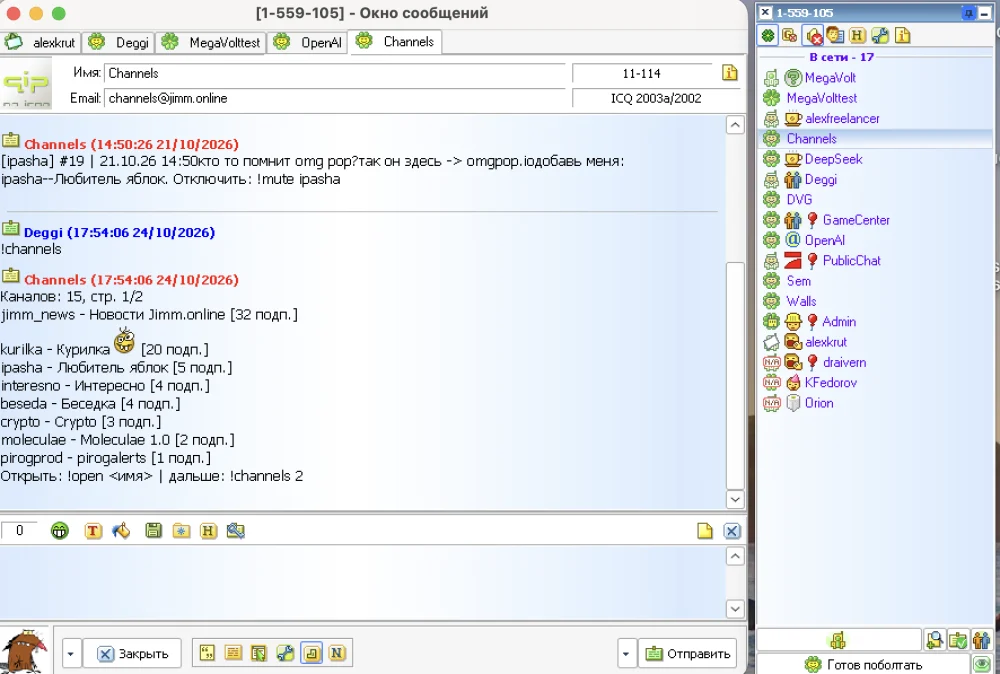
The solution. Add all of it without touching the protocol. Every new feature is an ICQ bot, an ordinary contact in your list. So it works in any client, from my QIP to Jimm on a push-button Nokia, with nothing to update. And the site shows the same things in a convenient form.
Here's each pain point in turn.
Empty contact list → AI bots
The problem: a newcomer has nobody to write to, and nobody writes to them.
The solution: on registration, two AI bots are added to the contact list straight away. The first thing a person hears after signing in is that very "uh-oh!" of an incoming message. You can chat with the bots, ask questions about the project, or simply check that everything works. The bot sits in "Free for chat", shows "typing…" and changes its x-status from time to time, just like a real person.
Nothing to read → channels
The problem: ICQ has no news feed, and authors have nowhere to publish.
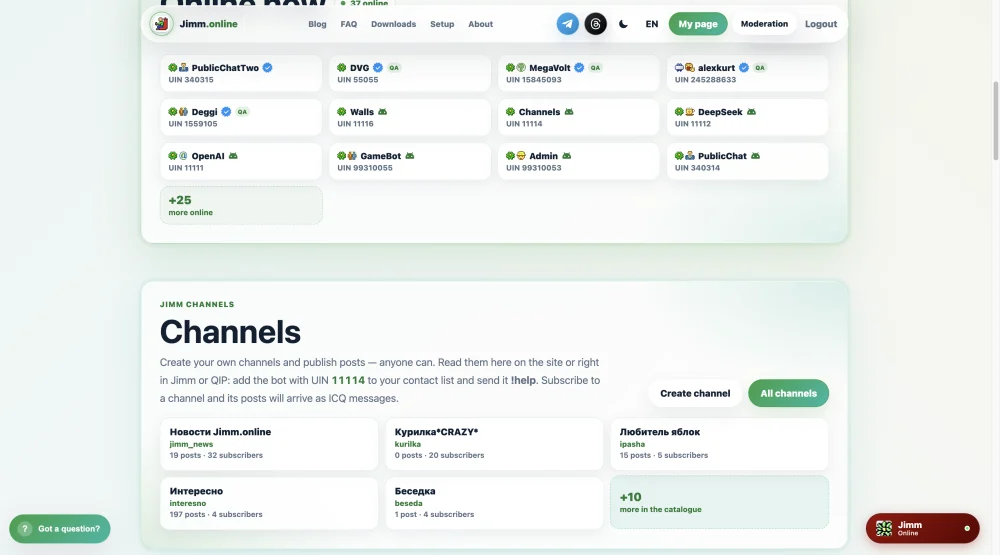
The solution: the Jimm Channels bot (UIN 11114), channels like in Telegram. Anyone can create a channel, appoint admins and publish posts. Subscribers receive posts as ordinary ICQ messages. The logic is simple and proven on the web: it's easier for authors to publish on a website and easier for readers to read in a messenger. So on the site channels have a publishing panel, while in ICQ they read like a normal conversation.
Nowhere to share → walls and graffiti
The problem: ICQ has only a status and a profile; there's nowhere to share something with friends.
The solution: the Jimm Walls bot (UIN 11115), walls like on early VKontakte (the Russian-speaking world's Facebook). Everyone has their own wall. You can post on yours, or on someone else's if you're in their contacts, and the owner gets notified by message. You can draw graffiti for a post: on the site it shows as a picture, in ICQ it arrives as a link.
Nobody to talk to right now → public chat
The problem: to talk to someone, you have to know them and add them. A newcomer has nowhere to go.
The solution: the Jimm Chat bot [UIN], one public chat for everyone, like the rooms of old chat sites. Send !join, and from then on everything you write reaches the other participants. To the client it's an ordinary conversation with one contact, so it works everywhere. There are nicknames (!nick), a participant list (!who), recent messages (!last) and moderation. The bot watches statuses: if a participant goes offline, the chat stops writing to them.
What it looks like in ICQ:
!create my_news My news — create a channel
!publish Hi, this is my first post — publish to the channel
!post Hi, this is my wall! — post on your own wall
!to 123456 Hi back — post on someone else's wall
!join — join the public chat
How it connects to the site
The site shows the same channels and walls through the bots' HTTP API. A post published from a phone in Jimm appears on the site. A wall post made on the site reaches the owner in ICQ. The site shows who's online right now, with status and x-status. If you're signed in, you can add someone to your contact list straight from the page, and they'll appear in all your clients. And on the home page you can listen to the classic ICQ and QIP sounds.
The result: from the first minute, a newcomer has someone to talk to, something to read and somewhere to post, in any client.
Social network and games
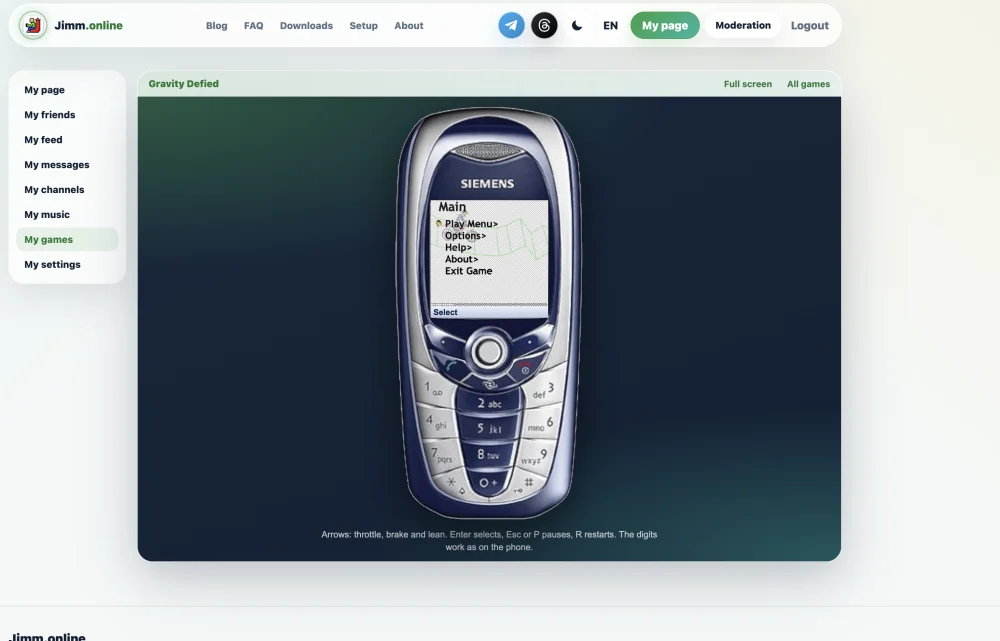
On the site everyone has their own page: friends and who of them is online, a feed of everything posted on walls and in channels, messages, channels, radio in Winamp, and games. The games include Gravity Defied (the very motocross trial from the Siemens C65), Solitaire, the Dino game, 2048 and more.
Mike and Open OSCAR Server: we make each other stronger
This project wouldn't exist without Mike. It's worth saying plainly, because from the outside it might look like we "just took a server".
What Mike brings:
- The server itself. The OSCAR protocol, authorization, contact lists, offline messages. Years of work I didn't have to repeat.
- The WebAPI. The web client, the extensions and the Telegram Mini App are built entirely on it. All 33 methods on /developers are his work.
- SSL. Port 5193 is his too.
- Speed. I came to Discord because my client wouldn't connect, Mike shipped a fix, and everything worked. I reported the server crash on re-login on October 1, and the fix landed on the 2nd.
- General solutions instead of one-offs. When I sent a fix tailored to Jimm and QIP, Mike built a solution that works for every client. That's what happened with Cyrillic in v0.25.0.
What we bring:
- Real-world load. Thousands of accounts, old phones, QIP, Jimm, flaky mobile networks. Hard to reproduce on a test bench.
- Problems we've found, with logs and root-cause analysis, together with a proposed fix.
- New scenarios: push for mobile, contact nicknames and avatars via the API, the server running a social network and bots.
| Found on Jimm.online | Outcome |
|---|---|
| Jimm 0.6.0 couldn't connect (#185) | fixed in v0.24.0 |
| Cyrillic in Jimm and QIP (#192) | general solution in v0.25.0 |
| Server crash on re-login over an existing session (#207) | fixed in v0.25.0 |
| Client stuck in a reconnect loop (#209) | fixed in v0.25.0 |
| Push for mobile (#208) | Mike is designing his own solution |
| Contact nicknames and avatars (#215) | under review |
| Login rate limit for the WebAPI (#218) | under review |
Until a general solution is ready, we keep temporary patches on our side. When it ships, we move to Mike's version.
Operations: what broke
- The server crashed when someone signed in to an account that already had a session, and every user dropped at once. I found it in the logs, described it to Mike (#207), and the fix appeared the next day.
- HAProxy restarts. An automatic libssl update restarted the proxy and cut every ICQ session at once. Any restart anywhere in the relay → HAProxy → server chain drops everyone, and that has to be planned for.
- Site slowness turned out not to be in the code but in noisy neighbours at the relay server's hosting provider (CPU steal).
- The AI bots first ran on paid OpenAI, and the account balance kept running out. Now part of the AI runs on our own model (qwen3) through a gateway on a Raspberry Pi. It's free, but slower.
- Debugging on users' devices. Instead of asking "send me a screenshot", the app sends logs straight from its settings, and I read them in the admin panel.
API documentation for developers
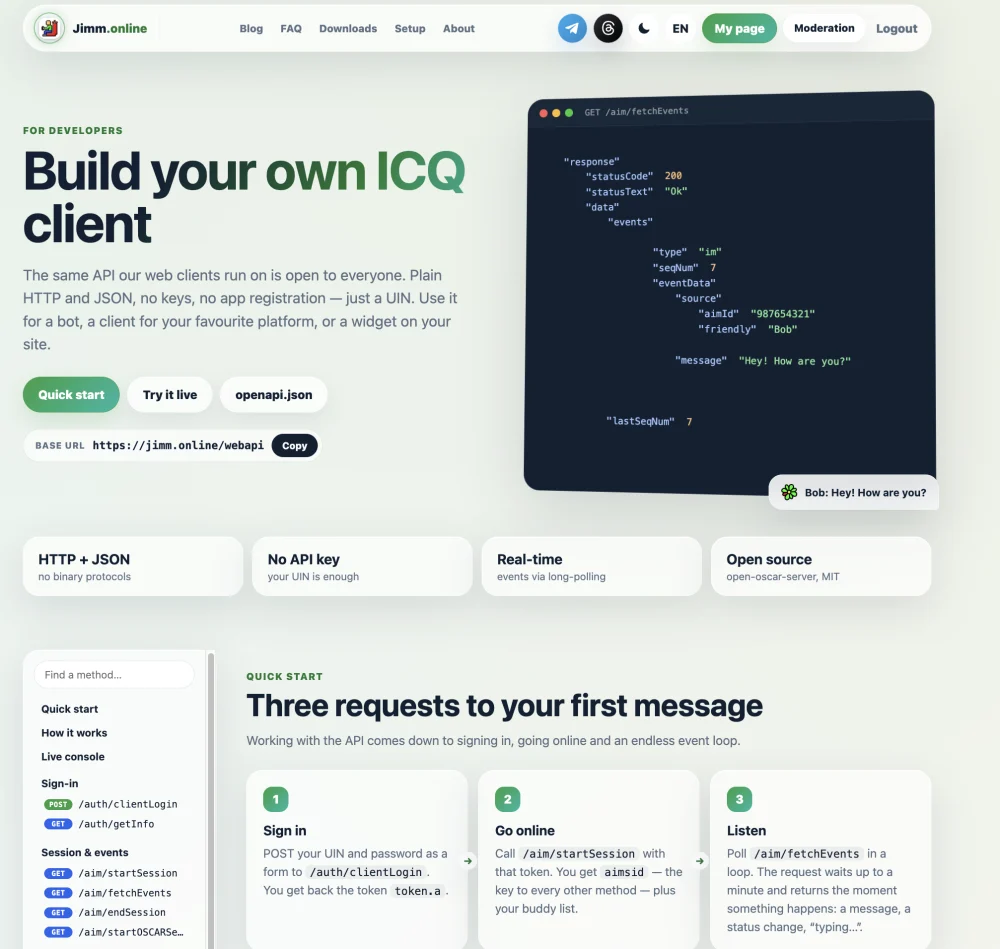
To be clear: the API itself isn't mine. It's the Open OSCAR Server WebAPI, 33 methods: sign-in, sessions, messages, statuses, contact list, profiles, search, avatars. My part is the jimm.online/developers page: documentation in seven languages, a live console where you can send requests right from the browser, examples in curl, JavaScript and Python, and an OpenAPI spec. That should be enough to write your own bot, client or integration.
What's next
- Games: leaderboards, challenging friends right in ICQ, and a place where third-party developers can publish their own games.
- An iOS app.
- Moving to Mike's general solutions for push and contacts, and building production from the main version of the server.
Links
- Website: jimm.online
- Server for clients: icq.jimm.online:5190 (SSL: 5193)
- QIP 2005 for macOS, Linux and Windows: jimm.online/qip
- Android: Google Play
- Chrome: Web Store
- Firefox: [LINK: AMO]
- Telegram Mini App: [LINK: bot]
- API documentation: jimm.online/developers
- Open OSCAR Server: github.com/mk6i/open-oscar-server
- Community: Telegram, Discord [LINK]
Thanks to Mike for the server and for always responding so quickly. Come with your old UIN. "Uh-oh!" 🌼
